
⚠️ A factory reset will erase all current configuration on the unit. Document or export your current configuration before proceeding if you may need to restore it later. Once the reset completes, this information cannot be recovered from the unit.
There are times when it's necessary to start fresh. So how do you go back to factory settings?
First, remove power to the encoder by removing the plug from the back of the unit.
 Then obtain a bent paper clip or a small pointed object.
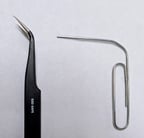

To the right of the 8 LED lights on the front panel of the encoder will be a small hole. Depending on how the encoder is mounted, you may need assistance with plugging power into the encoder. Insert the paper clip or pointed object into the hole and push the recessed button and hold it in while plugging in the encoder. Hold the recessed button in for 15 seconds and then release. The encoder will boot up into the original factory settings.